SIGNALS · RESEARCH · REVIEW
Warm first lines.
Sent by people.
Cuewarm spots buying signals, researches the companies that fit, and drafts outreach your team reviews. Approved emails go out from your own Microsoft 365 or Gmail mailbox.
No card for the trial · Your keys, your mailboxes · Cancel any time
Cuewarm · Review
SentFunding signal · 2h ago
Northwind Pay raised a $40M Series B to launch card issuing
Research brief
- [1]Card-issuing launch planned for Q1
- [2]Six open QA roles on the careers page
- [3]New CTO joined from a payments network
To Maya Chen, VP Engineering · Northwind Pay
Release testing before the card launch
Hi Maya, congratulations on the Series B. With card issuing going live in Q1 and six QA roles open, release testing is usually the first bottleneck. We help payments teams cut regression cycles from days to hours. Worth a 20-minute look next week?
Sent from your own mailbox · Tue 9:40 am
Works with the tools you already pay for
 Microsoft 365
 Gmail
 Anthropic
 Parallel
 Exa
 Apollo
 Icypeas
 Reoon
 HubSpot
 Salesforce
 Pipedrive
 Slack
 Zapier
 Google Sheets
 Calendly
How it works
From a signal on the web to a reply in your inbox, with a person in the loop.
- 01
Catch the signal
Monitors watch the web for the moments that make a company ready to buy: a new CRO, a funding round, an expansion, a first customer in your industry.
- 02
Find who fits
Describe your ideal customer in plain language. Cuewarm finds companies that match, explains why each one fits, and cites its sources.
- 03
Research, then write
Each draft is grounded in that company's news and priorities. Every claim links to its source, so you can check it before it goes anywhere.
- 04
A person approves every email
Nothing sends until someone on your team approves it. It then goes out from your own mailbox, at a human pace, inside your sending hours.
Product tour
See it work, screen by screen
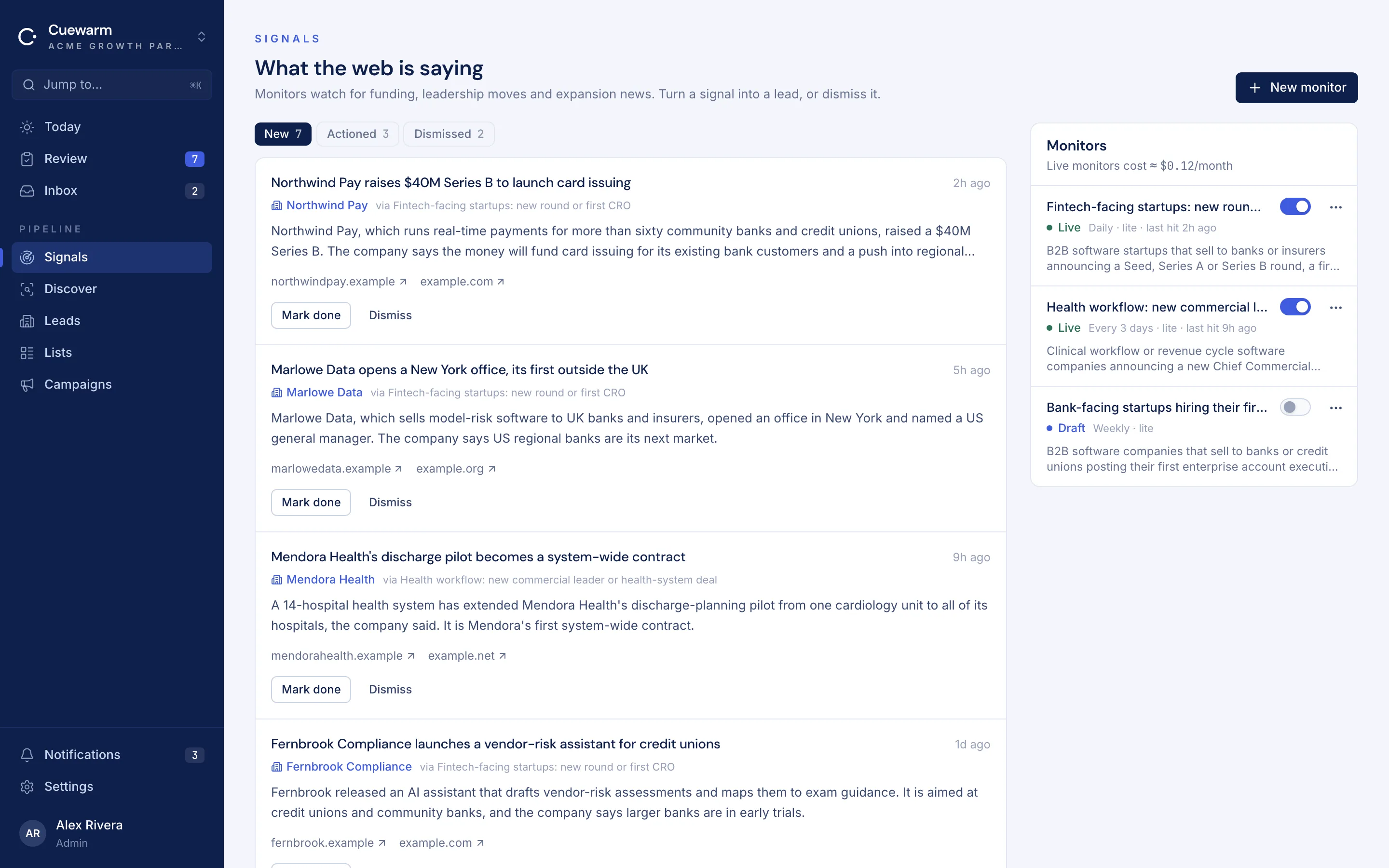
Buying moments, as they happen
Monitors flag funding rounds, new leaders, expansions and launches at the companies you care about, each with its source.
Features
Everything between the signal and the send
Signal monitors
Always-on web monitors for funding, leadership changes, expansions and launches. New matches land in Signals with the source attached.
Discovery in plain language
Describe an ICP in a sentence and get matching companies with a fit score and the reasons behind it. Find lookalikes of your best customers too.
Research briefs
Every company gets a short brief: priorities, recent news and leaders, each with sources, so drafts start from facts rather than guesses.
Decision-makers and verified emails
Find the people who decide through your Apollo or Icypeas plan, and verify addresses before anything is sent.
Drafts you review
First emails and follow-ups are written for each person and wait in a review queue. Edit, regenerate with a note, approve or reject.
Sequences with brakes
One to four steps per campaign. Follow-ups reply in the same thread and stop the moment someone answers.
Sending that looks human
Your own mailboxes, daily caps, sending hours and minutes between sends. No shared pools, tracking pixels or link shorteners.
Replies in one inbox
Replies are matched to their thread and sorted, so the interested ones reach the right person quickly.
Do-not-contact, enforced
Every email carries an opt-out, and one do-not-contact list covers every campaign, list and teammate.
Easy to run
Simple to manage, easy to keep running
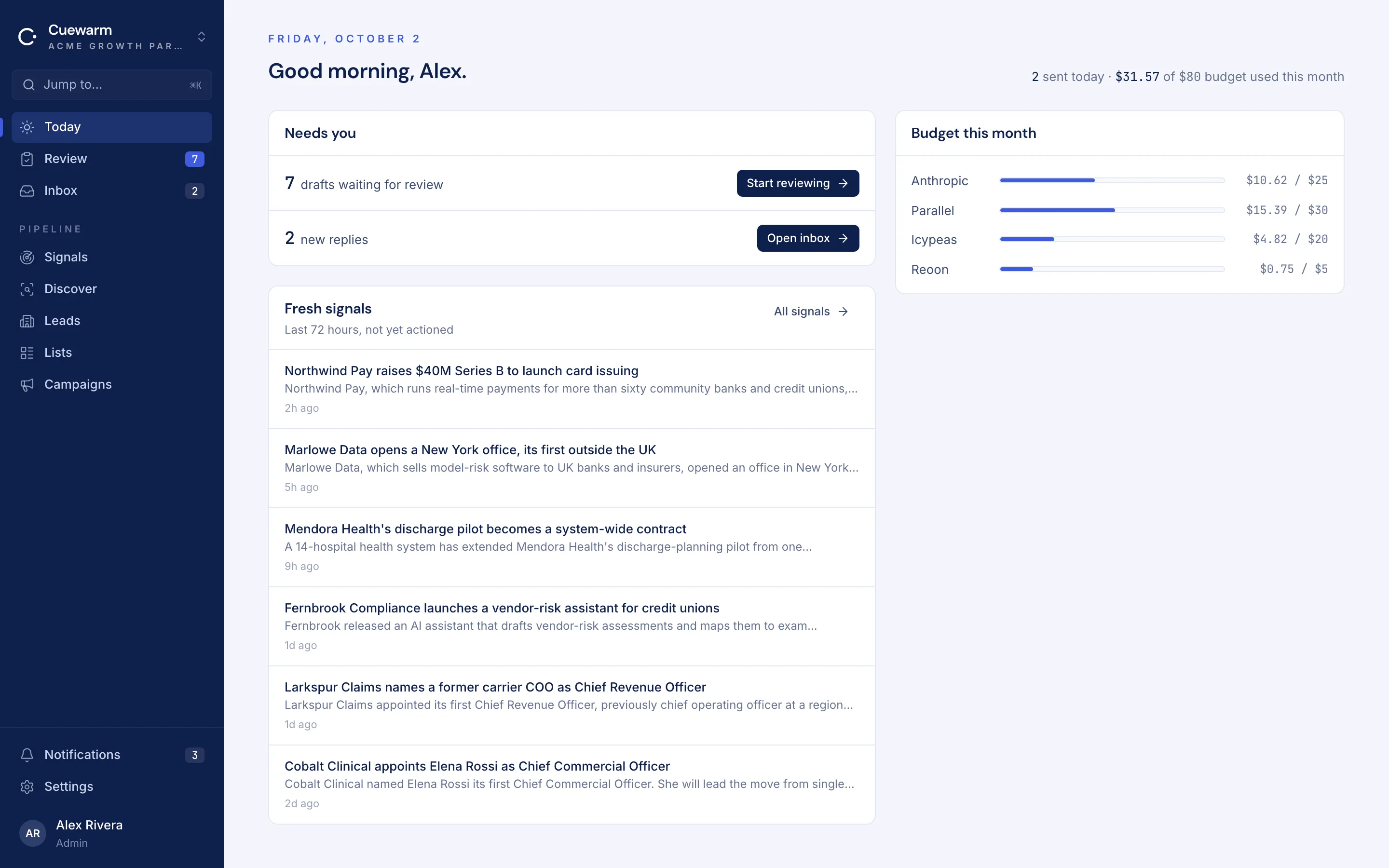
Ten minutes a day
Today shows what needs you: drafts to approve, new replies and fresh signals. Clear it with your morning coffee.
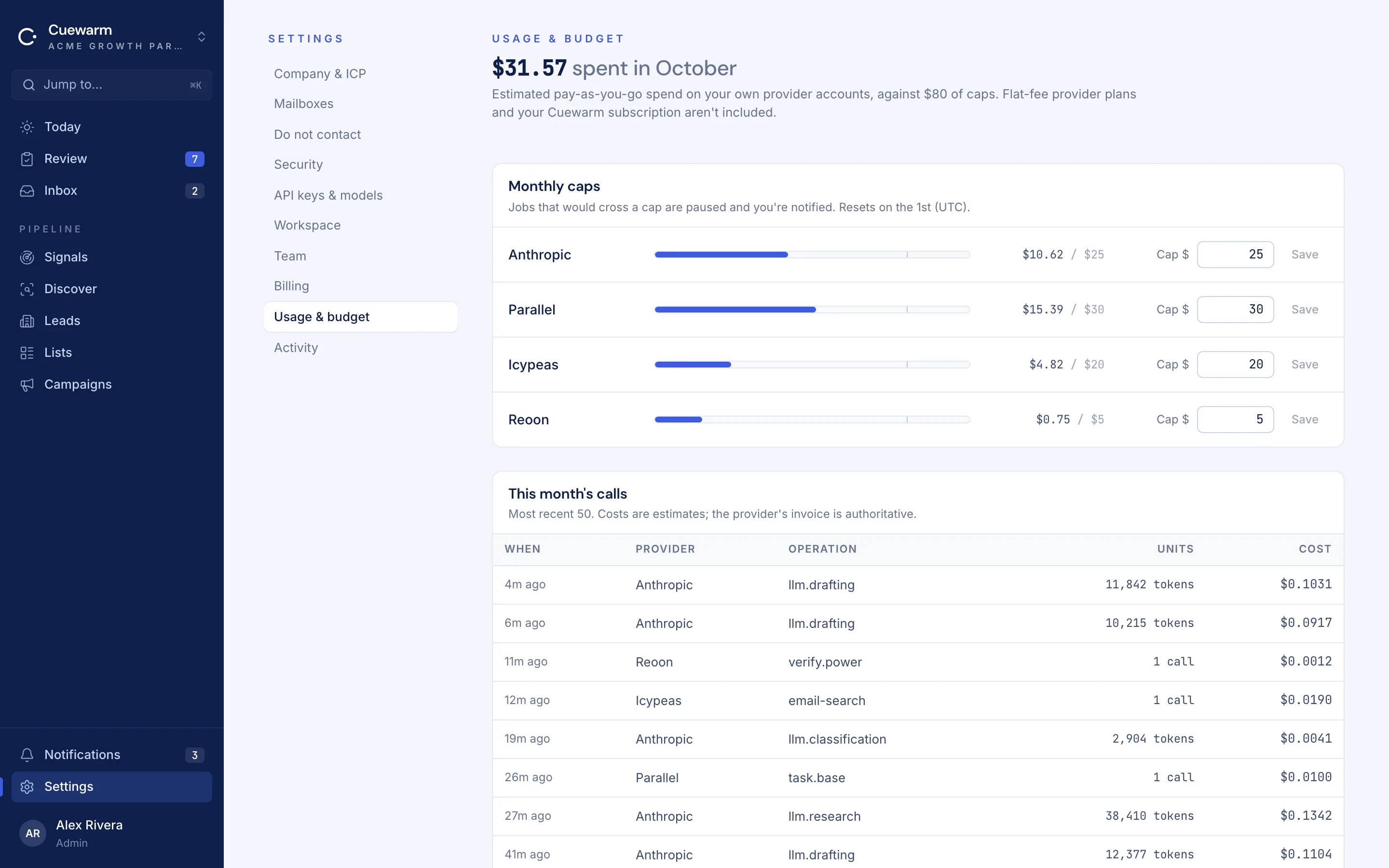
Budgets that hold themselves
Set a monthly cap for each provider. Spend shows up as it happens, and work pauses at the cap instead of surprising you.
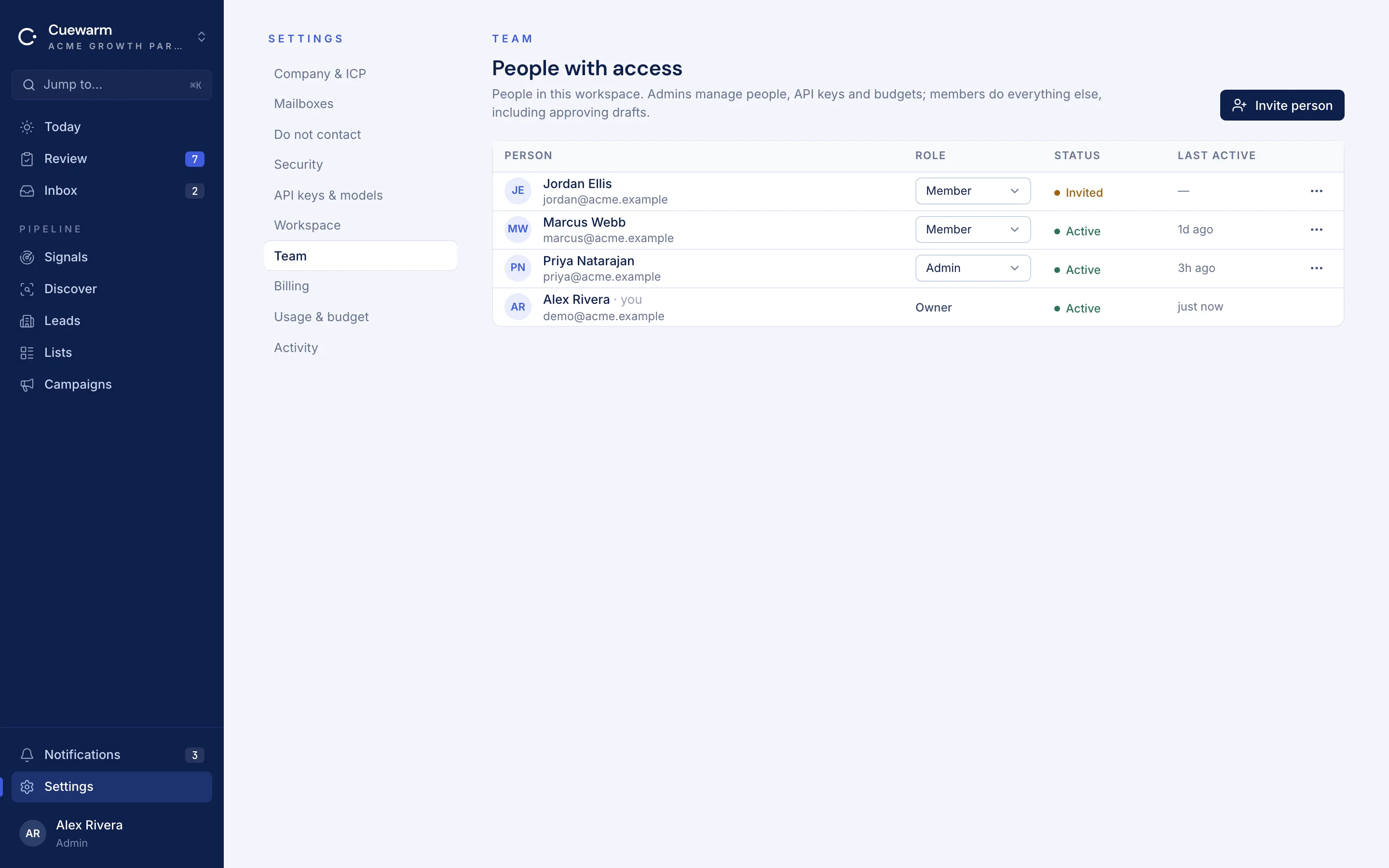
A team, with guardrails
Invite teammates as members or admins. Mailboxes, keys and limits stay with admins, and every change lands in the activity log.
Who it's for
Teams that would rather send fewer, better emails
Founders doing their own outbound
Spend ten minutes a day approving researched emails instead of an afternoon writing them.
B2B sales teams
Give each rep a queue of warm, sourced drafts for the accounts that matter this week.
Agencies and services firms
Run outreach for distinct offers or verticals from separate workspaces, each with its own keys and mailboxes.
Import & export
Your data moves with you
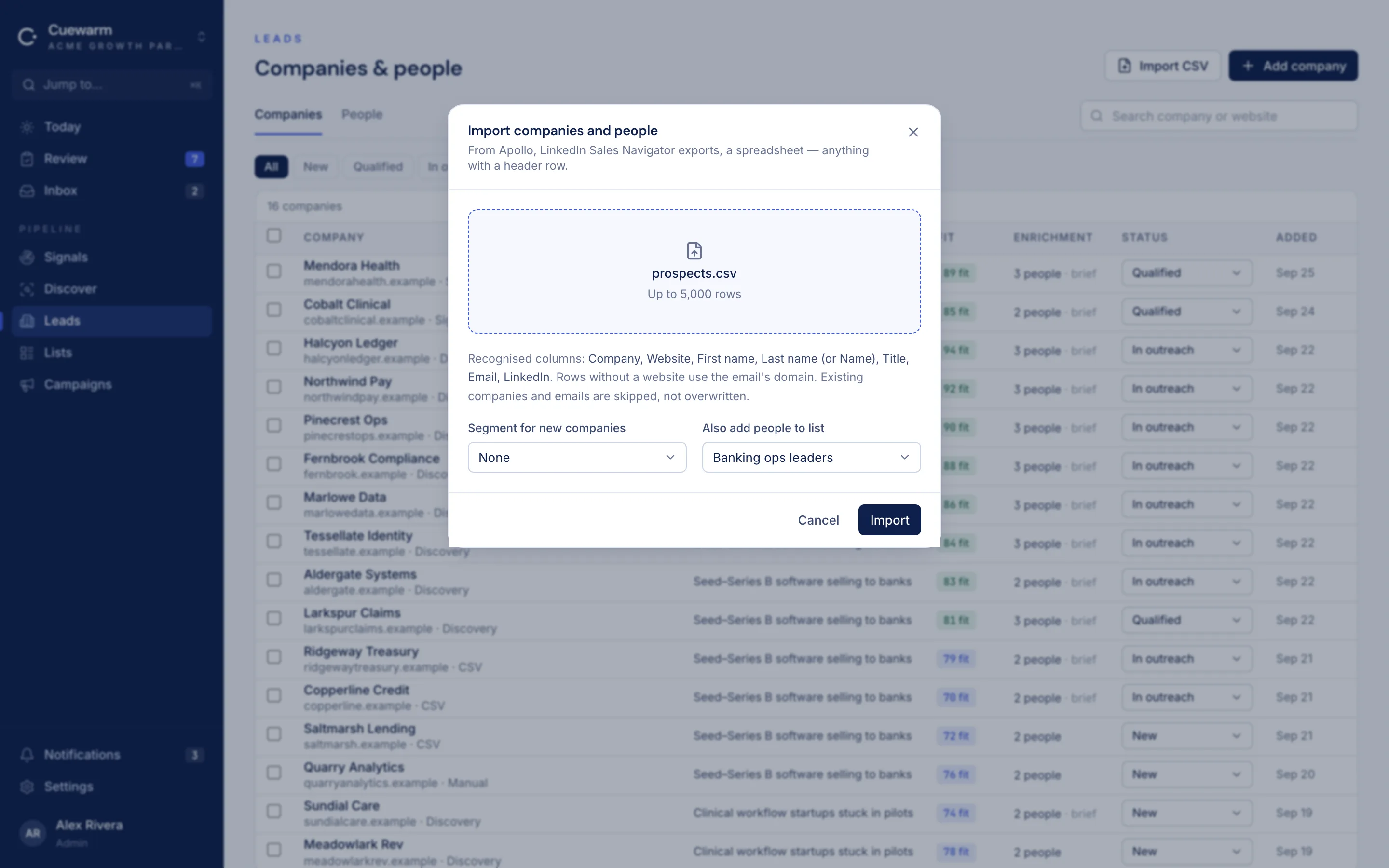
Import from any tool
Drop in a CSV from your CRM, a spreadsheet or another prospecting tool. Cuewarm maps company, website, name, title, email and LinkedIn columns, and files people straight into a list.
Export whenever you like
Download any list as a CSV, with people, companies and email status, ready for your CRM or a spreadsheet.
Set up a workspace in one go
Import a workspace pack with your company profile, ICP segments, do-not-contact list and signal monitors. Handy for agencies running several offers.
Connector library
Bring the tools you already pay for
Connect your own accounts. Their costs go straight to you, with monthly caps you set in Cuewarm.
Mailboxes
Microsoft 365
Outlook mailboxes
Gmail
Google Workspace mailboxes
AI & research
Anthropic
Drafting, research and reply triage
Parallel
Web monitors, discovery and research
Exa
Lookalike companies
People & email
Apollo
Decision-makers and work emails
Icypeas
Work emails
Reoon
Email verification
In development
Coming next to the connector library
HubSpot
CRM sync
Salesforce
CRM sync
Pipedrive
CRM sync
Slack
Reply and approval alerts
Zapier
Automations
Google Sheets
Export lists and results
Calendly
Booking links in drafts
Need another tool?
Tell us at hello@cuewarm.com
Product names and logos are trademarks of their respective owners and are used to show compatibility.
The difference
Not another bulk sequencer
Who writes the email
- Cuewarm
- Written for each person from cited research
- Bulk sequencer
- A template with merge fields
Who decides it sends
- Cuewarm
- A person on your team, every time
- Bulk sequencer
- The schedule
Where it sends from
- Cuewarm
- Your own Microsoft 365 or Gmail mailbox
- Bulk sequencer
- Shared pools or fresh domains
Tracking
- Cuewarm
- None
- Bulk sequencer
- Open pixels and link redirects
AI and data costs
- Cuewarm
- Your own accounts, billed to you directly
- Bulk sequencer
- Bundled and marked up
Security & privacy
Your data stays yours
Read the privacy policy for the full list of providers and what each one sees.
- API keys and mailbox sign-ins are encrypted at rest (AES-256-GCM) and never shown back in full.
- Each workspace's data is isolated; teammates only see the workspaces they belong to.
- Two-factor sign-in, roles for owners, admins and members, and an activity log of every change.
- Mailbox access is limited to sending what you approve and recognising replies to it.
- We don't sell data or use your workspace to train AI models.
Pricing
One flat price per workspace.
Starter
$49 / month
For a founder or a small sales team getting started.
- 3 people
- 2 sending mailboxes (Microsoft 365 or Google)
- 10 live web monitors · 20 searches a day
- 200 drafts a day · 10,000 contacts
- Every email reviewed by a person before it sends
Growth
$149 / month
For teams running several campaigns and mailboxes.
- 10 people
- 10 sending mailboxes (Microsoft 365 or Google)
- 40 live web monitors · 100 searches a day
- 1,000 drafts a day · 50,000 contacts
- Every email reviewed by a person before it sends
Questions
Frequently asked
Do I need my own API keys?
Yes. You connect your own Anthropic and Parallel accounts, and Apollo, Icypeas, Exa or Reoon if you use them. You pay those providers directly at their prices, and you can set a monthly cap for each one in Cuewarm.
Which mailboxes can I send from?
Microsoft 365 (Outlook) and Google Workspace (Gmail). Each teammate can connect their own, with its own daily limit and sending hours.
Will Cuewarm ever send without me?
No. Every first email and every follow-up waits for a person to approve it. Paused or disconnected mailboxes send nothing.
How much does the AI cost?
It depends on your provider's prices and how much you send. Cuewarm shows your usage by provider and stops at the monthly caps you set, so there are no surprises.
Is my data used to train models?
No. Your workspace data is only used to run your workspace. See the privacy policy for the providers involved.
Can I bring my existing lists, and take them out again?
Yes. Import a CSV from your CRM, a spreadsheet or another tool and Cuewarm files people straight into a list. Any list downloads back out as a CSV.
Which connectors are coming next?
HubSpot, Salesforce and Pipedrive for CRM sync, Slack alerts, Zapier, Google Sheets and Calendly are in development. Tell us what you need at hello@cuewarm.com.
Can I cancel any time?
Yes. Plans are monthly, every workspace starts with a 14-day free trial with no card, and your data stays in your workspace if you pause.
Start with the accounts that are ready now.
Set up a workspace, connect a mailbox and review your first drafts the same day.